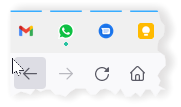
Firefox provides the ability to “pin” a tab, so it stays in a fixed spot to the left of your browser. I use this for my email and other messaging apps:
However, sometimes for some inexplicable reason, the pinned tabs disappear after shutting down Firefox and starting again. They are supposed to start automatically if you have selected “Restore Previous Session” in Settings->General.
How go get them back ? Simple, just like any other Window or tab that has been closed, you can reopen them through the History menu. Open the History menu (if the Menu is not showing right click on the top bar and select “Menu Bar”). From there, click on “Recently Closed Tabs” or “Recently Closed Windows”. Find your lost tab or window and click to open.
Avoiding Browser Plugins with KeePassXC KeePassXC is a popular free open source password manager. As…
If you've had a Gmail account for years, like I have, at some point you…
Here's a little trick I use to back up my Raspberry Pi without having to…
I try to keep my email inbox fairly clean but I do subscribe to some…
I was recently faced with the dreaded prospect of re-installing Windows 10. While the standard…
Pi-Hole and Upstream DNS Providers Pi-hole is an excellent whole-home, self-hosted ad blocker and DNS…