This tip involves changing the Windows Registry. Changing the Registry can harm your computer if you do it incorrectly!! It is highly recommended that before you implement any registry changes, you make a backup of your registry using the microsoft way or some third party tool like Regbak from AceLogix. If you are not comfortable with the registry do not make changes since changes can cause your computer not too boot which means that you may have to re-install Windows and lose your data.
If you see bold blue double underlined hyperlinks under several words on almost everypage of your browser you probably have rrFilter installed or similiar malware. Here’s an example of what it looks like on your browser page (double click to enlarge)
RRFilter will also redirect you to srv123.com – in Chrome, for instance I noticed tabs that would just spontaneously popup with long url’s starting with srv123.com. rrFilter is particularly aggressive and hard to remove. I scanned my system with 4 different spyware/malware tools and none of them found it. I finally decided to manually search out and destroy it.
Here’s how to disable and remove rrFilter from your system (at least as of 4-12-14. These programs constantly change their way of installation to hide themselves so if you look on your system for rrFilter you may find they have installed under a different name or somewhere else on your system then what’s shown in this tutorial. So if the Short Version doesn’t work for you try the longer more detailed version below to understand how to figure out what to delete and remove).
To Disable and Remove From Your System:
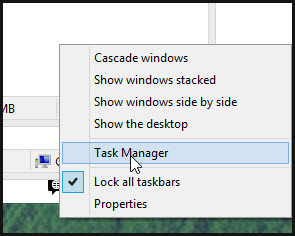
I immediately right clicked and clicked “End Task” and it died! I reloaded my browser and the browser links went away!. Sorry – no screen shots of that as I forgot ! But not done yet…
Can’t remember exactly but believe this led me to the GUID of CA901A03-85D9-4901-9555-59F2AED61F4 which eventually gave me the path to rrfilter and bukgmhvrux. I then went back and stopped the rrfilter service and deleted the folder.
If you still have issues, than it probably isn’t rrFilter that is causing the problem. It could be a malware browser exension or some program that is located elsewhere. Check all your Google Chrome extensions, IE Extensions, Firefox extensions and uninstall anything that is not needed or looks strange. Especially any that were installed around the time you started experiencing the popups. Also go into Control Panel->Programs and Features and start uninstalling any programs you did not intentionally install that were installed around the time you started experiencing problems. Run a few malware finding programs. I won’t go into detail here but here’s a link that does:
http://malwaretips.com/blogs/remove-adware-popup-ads/
Avoiding Browser Plugins with KeePassXC KeePassXC is a popular free open source password manager. As…
If you've had a Gmail account for years, like I have, at some point you…
Here's a little trick I use to back up my Raspberry Pi without having to…
I try to keep my email inbox fairly clean but I do subscribe to some…
I was recently faced with the dreaded prospect of re-installing Windows 10. While the standard…
Pi-Hole and Upstream DNS Providers Pi-hole is an excellent whole-home, self-hosted ad blocker and DNS…